
Transform JavaScript Functions into CLI Commands
Write once, run anywhere. Bunosh is the modern CLI task runner that transforms your JavaScript functions into executable commands with zero configuration.
Quick Start
Write JS Code
No need to choose over Bash or JS, use best of two!
// Bunoshfile.js
export async function helloWorld(name = 'person', opts = { cleanup: false }) {
  say(`👋 Hello, ${name}!`);
  const city = await ask('Which city do you live in?')
  const result = await fetch(`https://wttr.in/${city}?format=3`)
  say(`Weather in your city ${result.output}`)

  if (!opts.cleanup) return;

  await shell`rm -rf ${require('os').tmpdir()}/*`;
  say('🧹 Cleaned up! Have a great day!');
}
See it Running
Watch how Bunosh transforms your JavaScript function into an interactive CLI command
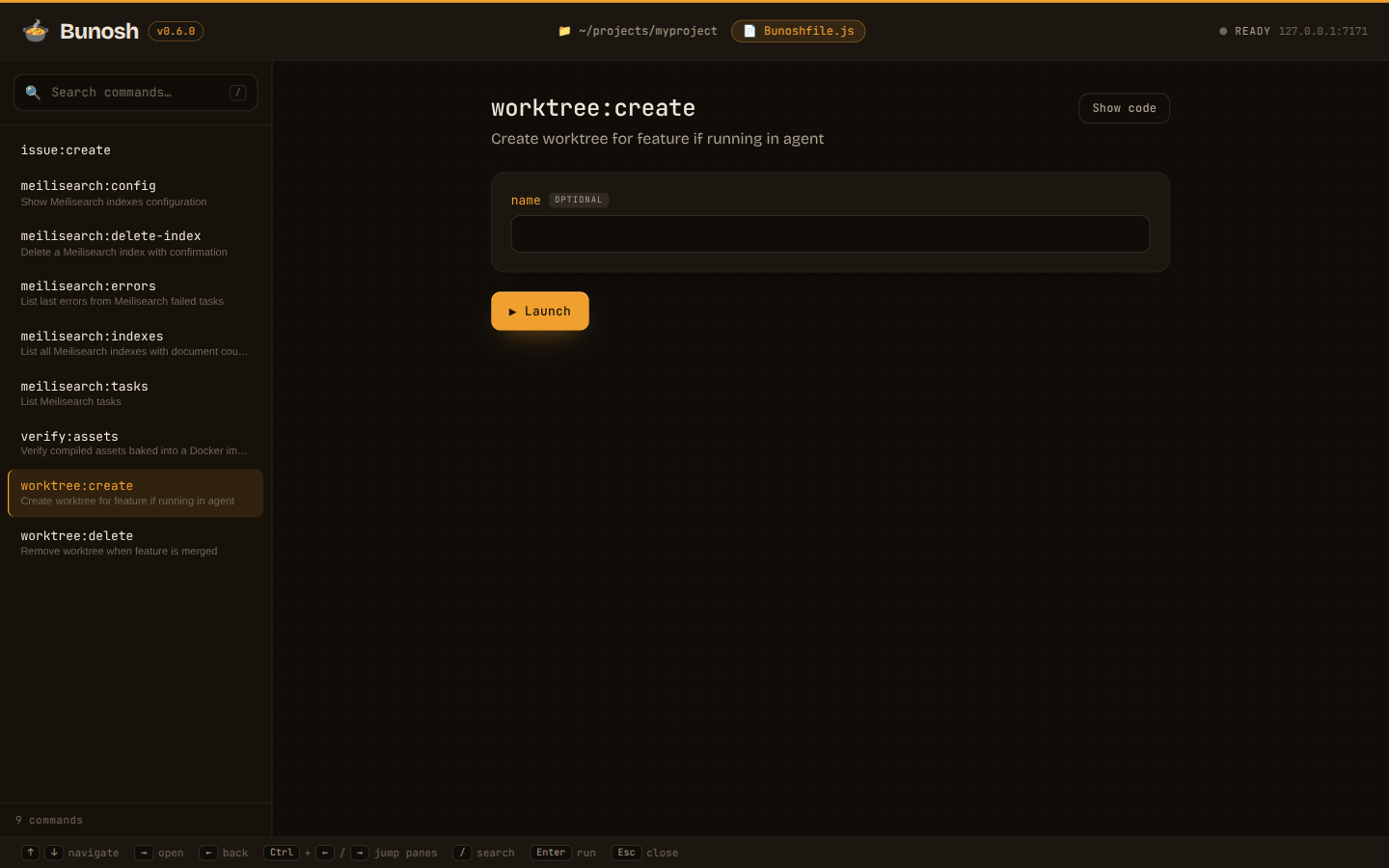
👋 Hello, Developer!? Which city do you live in? › Weather in your city ⛅ +18°C🧹 Cleaned up! Have a great day!bunosh ui A UI for Your Commands
Run bunosh ui and every task in your
Bunoshfile.js becomes a searchable, clickable
command palette in your browser. Pick a command, fill in its arguments, hit Launch —
output streams right below.
Why Choose Bunosh?
Built for modern developers who value simplicity, speed, and developer experience.
No Bashit
You don't want to write bash. Conditionals, loops, parallel tasks, is not what it does the best.
Zero Configuration
No YAMLs, no JSONs. Only functions from Bunoshfile.js.
JavaScript Native
Write your tasks in familiar JavaScript or TypeScript. No new syntax to learn.
Easy to Start
Install once as a single executable or globally via bun. Run from any folder.
Auto CLI
Automatically generates CLI interface from your function parameters and JSDoc.
AI Built-In
Apply agentic approach. Ask LLMs to analyze results or suggest next commands.
All Your Scripts in One Place
No more digging through a pile of bash scripts, scattered
package.json entries,
and a Makefile nobody remembers. All your project's tasks live in a
single Bunoshfile.js:
one entry point for execution. Scan the function outline and you see
every task your project can run.
// Bunoshfile.js — every script your project needs, in one place

export async function deploy(env = 'staging') { /* ... */ }

export async function dbMigrate() { /* ... */ }

export async function testE2e(opts = { headed: false }) { /* ... */ }

export async function releaseNotes() { /* ... */ }
Power in Simplicity
See how Bunosh transforms simple JavaScript functions into powerful CLI tools
JS is now in CLI
Transform any JavaScript function into a powerful CLI command. No configuration, no setup - just write the function and it's ready to use.
$ bunosh greet --name=Alice // hello.js
export function greet(opts = {name: 'World'}) {
console.log(`Hello, ${opts.name}!`);
}Interactive I/O
Create interactive CLI tools with simple async/await syntax. Ask questions, get input, and build complex workflows naturally.
ask say yell // print information
say('I need to ask you few questions!')
// ask for input in interactive mode
const name = await ask('Who are you?');
// provide options to select
const env = await ask('Environment?', ['staging', 'production']);
// ask for confirmation
const confirm = await ask(`Deploy to '${env}'?`, true);
yell('Thanks!')Minimal Set of Tasks
You don't need to remember complex API of tasks. We gave you few, while everything else can be done by NodeJS/Bun API.
shell fetch writeToFile await shell`
mkdir -p ${dest}/${backupName}
cp -r ${source}/* ${dest}/${backupName}
`;
await shell`npm run build`.cwd(`${dest}/${backupName}`);
await fetch('https://api.example.com/webhook', {
method: 'POST',
headers: {
'Content-Type': 'application/json',
},
body: JSON.stringify({ message: 'Backup created' }),
});AI Interactions
Connect your AI provider and call it as regular tasks. By default AI returns structured output which can be passed to other tasks. @ai-sdk is used under hood.
ai const releaseNotes = await ai(
`Generate notes changes:
Commits: ${gitLog}
Group changes logically and write user-friendly descriptions.`,
{
features: 'New features',
fixes: 'Bug fixes',
});Skills for AI Agents
Install the official Bunosh skills so your AI agent writes correct Bunoshfiles and migrates your old scripts for you. Once the skills are added, just ask your agent — it can install and set up Bunosh in your project for you.
bunosh-fundamentals
Teaches your agent how exported JavaScript functions become CLI commands, how arguments and options map, and how tasks behave. Use it when writing, editing, or debugging a Bunoshfile.js.
migrate-to-bunosh
Converts existing bash scripts, npm/package.json scripts, Makefiles, or standalone Node.js scripts into a single, clean Bunoshfile.js — no more pile of shell scripts.
Add both skills to your agent in one command:
npx skills add DavertMik/bunosh-skillsOther installation methods
# Claude Code plugin (recommended for Claude Code)
/plugin marketplace add DavertMik/bunosh-skills
/plugin install bunosh@bunosh-plugins

# GitHub CLI skill extension
gh skill install DavertMik/bunosh-skills bunosh-fundamentals --agent claude-code --scope user
gh skill install DavertMik/bunosh-skills migrate-to-bunosh   --agent claude-code --scope user